New Year video studio
Goodbye 2026 Welcome 2027 AI
TryH3 is a Goodbye 2026 Welcome 2027 AI video generator that turns one portrait into a 10-second vertical MP4, with packs from $5 and up to 5 free credits for eligible signups. Pick the highway farewell or summit climb, or create a scene with a setting photo or prompt. Output ranges from 480p to 4K by model and starts at 17 credits. Unpaid downloads carry a moving watermark.
1 portrait · 10 seconds · 9:16 MP4
1. Add your portrait
Use one clear photo of an adult, with the face visible. JPG, PNG or WebP, up to 10 MB.
17 credits for this run · A completed purchase unlocks clean downloads.
Watch the two scenes
Choose a clip to preview its scene. Your own video runs for 10 seconds.
11.4 seconds, silent. Two versions of a woman in grey meet beside a suitcase. One takes the car while the other watches it recede along the wet highway.
Which Goodbye 2026 Welcome 2027 video should I make?
Choose Highway farewell to meet your future self beneath the 2026 and 2027 road signs. Choose Summit climb to stand on the stone year while the camera pulls back over the mountains. If you want to spend midnight somewhere else, choose Your scene. A setting photo shows the model the location, a short prompt tells it what happens, and your portrait supplies the person.
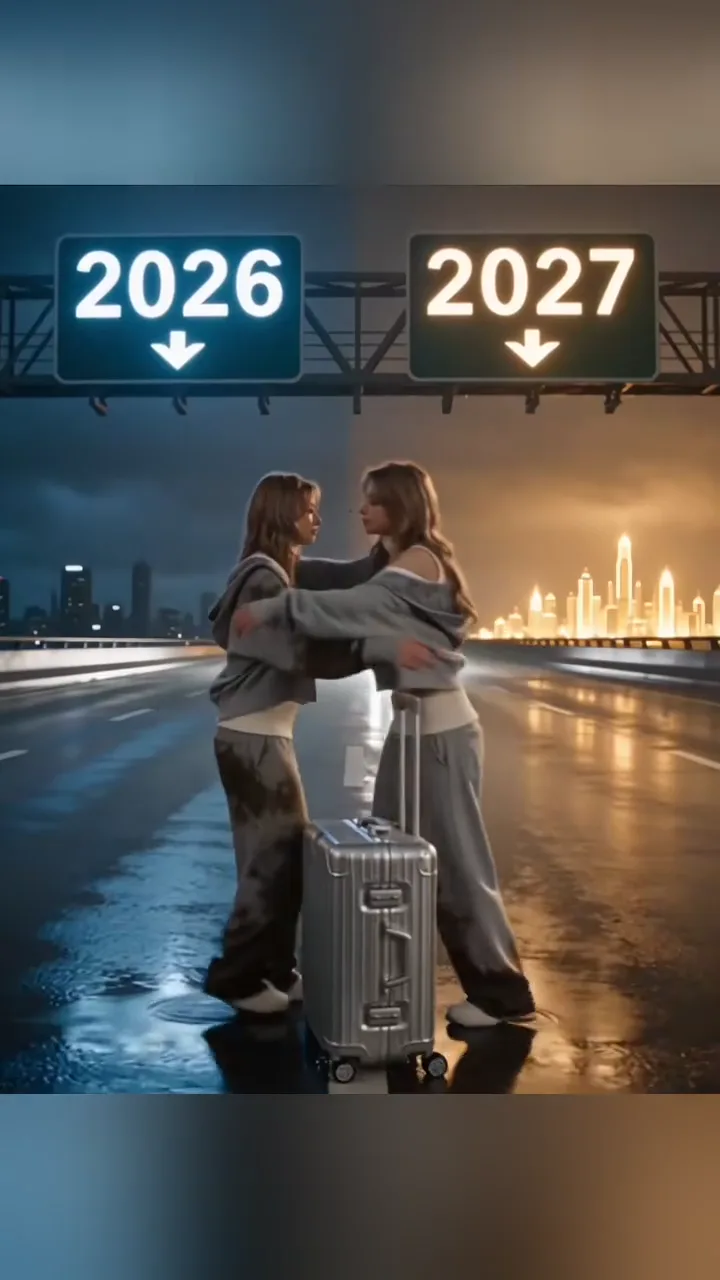
11.4 seconds, silent. Two versions of a woman in grey meet beside a suitcase. One takes the car while the other watches it recede along the wet highway.
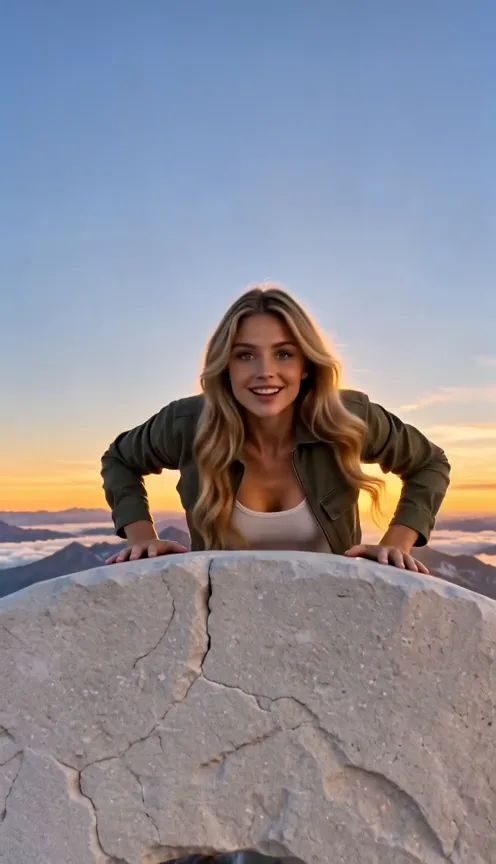
10.08 seconds, with sound. A climber pulls herself onto the stone zero and opens her arms. The camera backs away until the whole 2027 fits across the ridge.
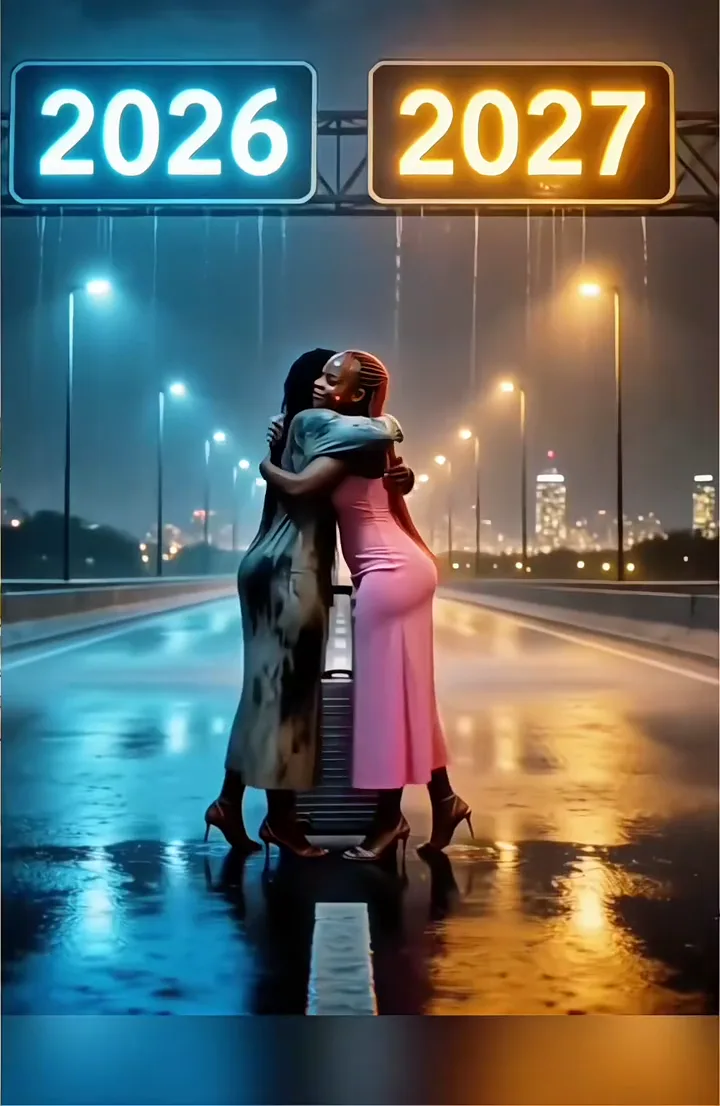
4.9 seconds, silent. Two women reach across a suitcase under blue and amber year signs. Lightning flashes before the woman in pink gets into the car.
How do I make Goodbye 2026 Welcome 2027 videos from one photo?
Upload a portrait with one adult face in even light. Pick a picture card for the highway or summit, or open Your scene to add a setting photo, a written direction, or both. For a custom clip, describe an action the person can finish in ten seconds. Then choose your model and resolution, check the credit quote and generate. The finished MP4 is available here and in My creations.
Pick one portrait
Use a photo you own or have permission to animate. Keep the face clear of sunglasses, other people and your phone.
Choose the scene
Pick a preset card, or use Your scene to add a background photo or written idea. Choose the model, resolution and sound before generating.
Generate and save
Check the quoted credits, sign in and generate. Play the finished clip through the last frame, then use Download MP4.
How much does a 2027 New Year AI video cost?
A preset or custom scene costs 17 credits with Seedance 2.0 Mini at 480p, or 36 at 720p. A $5 Trial pack holds 24 credits, enough for one 480p Mini video with seven credits left. Eligible new accounts receive up to five free credits, which cover part of a render. A completed purchase unlocks clean downloads for eligible videos, including earlier marked copies.
| Access | Price, allowance and download |
|---|---|
| Signup gift | Up to 5 free credits for eligible signups. Minimum render costs 17 credits. |
| One-time Trial | $5 for 24 credits. Covers one 480p Mini video. |
| MP4 downloads | Unpaid accounts receive a moving TryH3 mark. A completed purchase unlocks clean downloads for eligible clips. |
| Model | Resolution | Credits |
|---|---|---|
| Seedance 2.0 Mini | 480p | 17 |
| Seedance 2.0 Mini | 720p | 36 |
| Seedance 2.0 Fast | 480p | 36 |
| Seedance 2.0 Fast | 720p | 78 |
| Seedance 2.0 Pro | 480p | 60 |
| Seedance 2.0 Pro | 720p | 129 |
| Seedance 2.0 Pro | 1080p | 320 |
| Seedance 2.0 Pro | 4K | 652 |
| Seedance 2.5 | 480p | 87 |
| Seedance 2.5 | 720p | 195 |
| Seedance 2.5 | 1080p | 483 |
| MiniMax H3 | 768P | 52 |
| MiniMax H3 | 2K | 83 |
| Seedance 1.5 Pro | 480p | 19 |
| Seedance 1.5 Pro | 720p | 40 |
| Seedance 1.5 Pro | 1080p | 98 |
What can go wrong with the faces, year signs or climb?
The highway hug can briefly merge the two faces, especially when hair or hands hide a cheek in your portrait. Use one evenly lit face with both eyes visible. On the summit, the pullback makes the face smaller and can blur a hand against the stone. Watch all four digits as the camera moves. For an announcement that needs exact lettering, add a typed year caption to the downloaded clip.
How do the New Year video tools compare?
TryH3 and Seadanse offer a ten-second scene with a choice between the highway and the summit. ReelMuse offers a shorter pullback from a selfie into a New Year scene. Compare the length and the action first, then check the price for the file you want. Each service sets its own credit value, so the same number of credits can buy different things.
| Tool | Price for this effect | Free allowance | Watermark | Output |
|---|---|---|---|---|
| TryH3 | 17–652 credits. Packs from $5. | Up to 5 signup credits if eligible. | Moving mark before a purchase. Clean eligible downloads after purchase. | 10-second vertical MP4 with two presets or a custom setting. |
| Seadanse | $9.90 for one 720p clip. | No free render of this effect. | Paid plans include clean video. One-time pack terms for this effect are not disclosed. | 10-second vertical video, highway or summit, with sound. |
| ReelMuse | 110 credits for the photo and video together. | Not disclosed for this effect. | Not disclosed for this effect. | A still and a 5-second camera pullback. |
What else should I know before I generate?
One adult portrait supplies the identity for a single ten-second scene. For a quiet greeting, choose a Seedance model and turn sound off before generating. For a series, budget one render per portrait and allow for any extra takes you choose to make. The questions below cover the scene names, photo framing, sound and how credit charges work.
Is Adieu 2026 Bienvenue 2027 the same as Goodbye 2026 Hello 2027 AI?
Both names are used for year-change videos. Look at the action to choose yours. A person climbing the giant stone numbers is the summit version. Two selves with a suitcase and a car belong to the highway farewell.
Can I start with a waist-up portrait?
Yes. For the highway, use a sharp waist-up photo with your face and shoulders in view. The model invents details outside the crop. For the climb, use a full-body photo if you want your trousers and shoes to carry into the shot.
Can I use two different people for the highway hug?
This scene gives the same person a past and future self from one photo. For a greeting with two separate people, use the two-photo AI Hug Video generator.
Can I add my own music after downloading?
Yes. Choose Silent on a Seedance model to leave room for your track. MiniMax H3 always generates sound, which you can mute in your editor. Add your chosen recording to the downloaded MP4.
How many credits do twelve 720p videos take?
Twelve Seedance 2.0 Mini videos at 720p take 432 credits at 36 credits each. Generate each portrait separately. Each extra take costs another 36 credits at those settings.
What happens to my credits if the render fails?
A failed generation returns its reserved credits. A completed video uses the quoted credits even if you would like a different expression or a clearer year sign. Generating another take costs the displayed price.
Can I use my own background photo or write the scene?
Yes. Open Your scene and keep your portrait in the first upload slot. Add a photo of the location, describe the setting and action in up to 600 characters, or combine them. Seedance 1.5 Pro uses the portrait as its first frame and accepts text for the scene. The other five models also accept a separate setting photo.