TWO PHOTOS · TWO ROLES · ONE STUDIO CLIP
Oh You Can Make It Cap AI Video Generator
Oh you can make it cap is the two-person 20 vs 1 reaction meme: one person asks for a turn and laughs, while the other spins and says “oh he tweaking.” Cast both parts with two photos. This tool makes a 15-second landscape MP4 with the fixed sound at 480p–1080p, from 156 credits. Previews are free; the 5-credit signup gift cannot fund a render. Paid customers download without the site watermark.
Photo 1 laughs · Photo 2 spins · Fixed original sound
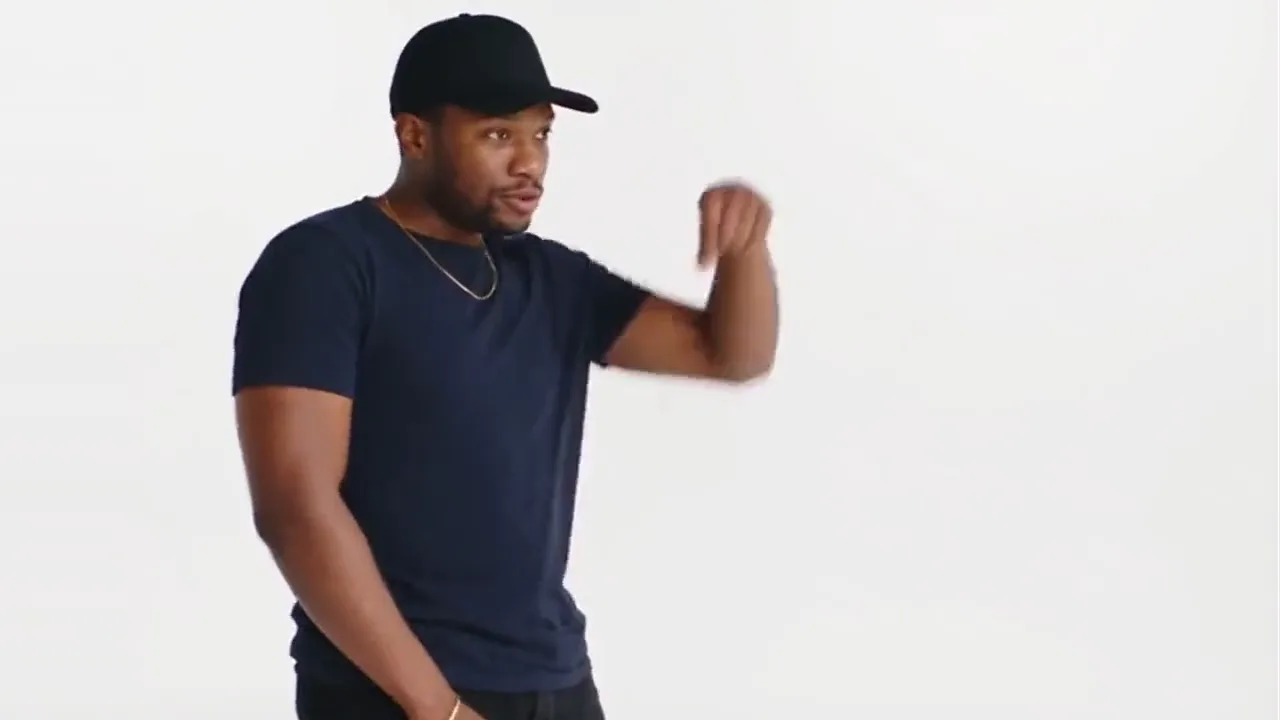 Photo 1 · The laugher
Use a separate photo in each slot. To play both parts, upload your photo to both slots.
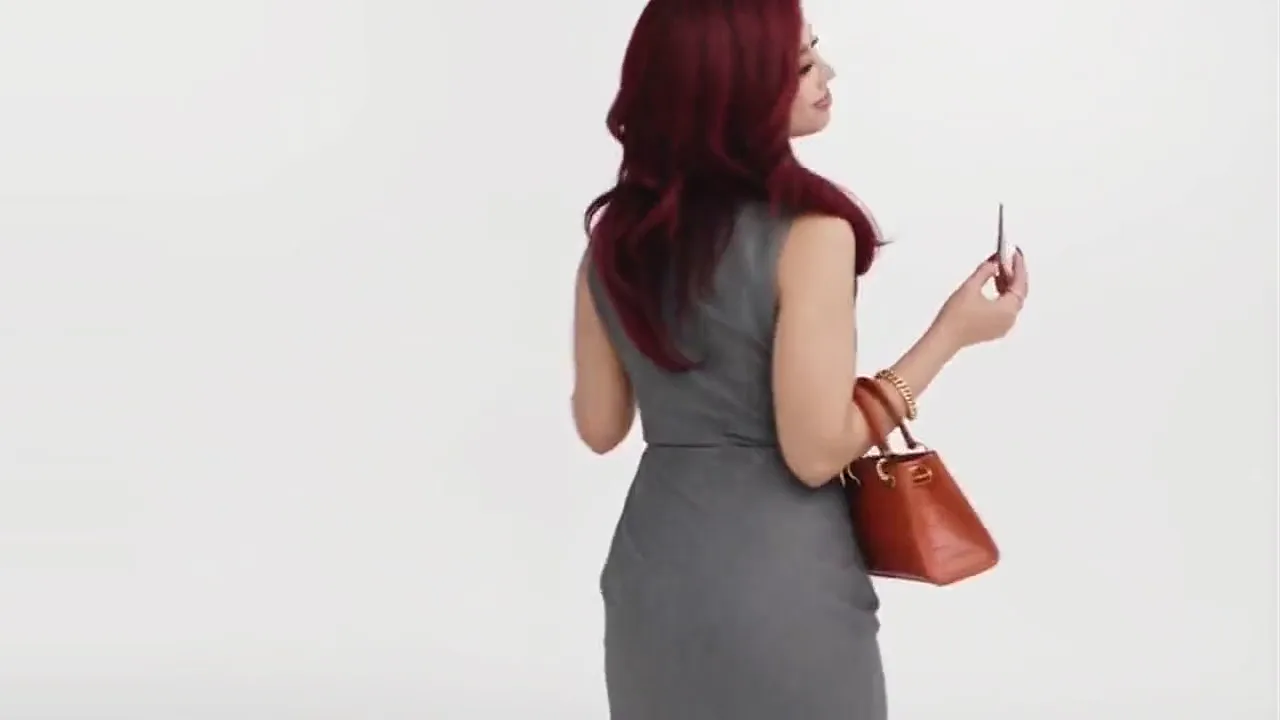 Photo 2 · The spinner
Use a separate photo in each slot. To play both parts, upload your photo to both slots.
One consenting adult per photo, clearly visible from the waist up. Face the camera in even light; avoid group shots, masks and heavy filters.
15 seconds · Landscape 16:9 · 480p · MP4 with sound
This video costs 156 credits. Charged when you start, refunded automatically if it fails.
From 156 credits. The 5-credit signup gift and $5 / 24-credit Trial cannot fund this template. See the full prices below.
What does the oh you can make it cap meme look like?
The turn, the hand-over-mouth laugh and alternating replies. About 15 seconds with sound; framing and expressions vary.
What is the 'oh you can make it cap' trend everyone keeps posting on TikTok?
Oh you can make it cap is a two-person reaction meme associated with a 20 vs 1 dating-show clip, recast using new faces. TryH3 takes two adult photos and produces a 15-second 16:9 MP4 with the fixed soundtrack at 480p, 720p or 1080p. Generation starts at 156 credits; free browsing and the 5-credit signup gift do not include a render. Accounts without a purchase receive a site watermark.
| Before you upload | This template |
|---|---|
| Photos and roles | Two photo slots: laugher first, spinner second. The same person can fill both. |
| Output | 15-second landscape 16:9 MP4 · 480p / 720p / 1080p · Seedance 2.5 |
| Sound | Fixed meme soundtrack restored after generation. No custom dialogue or voice cloning; lip-sync can drift. |
| Free access | Watch previews and copy the prompt free. Eligible signup gift: 5 credits; minimum generation: 156. |
| Site watermark | No purchase history: moving TryH3 mark. Paid customers: download without that mark. |
The oh you can make it cap original is a spoken exchange, not a music-video dance. In the dating-show clip, a request for a 360 turn leads to a teasing question and an exaggerated laugh. The other speaker responds with “oh he tweaking.” The search spelling uses “cap,” although the spoken word is “clap.” AI remakes recast the two roles in a plain studio, so faces, outfits and some reaction shots differ between versions. This template follows the studio remake shown above. It does not recreate every edit, add a second stacked video or turn the phrase into a song.
Dating-show clip linked in the trend researchWas this originally from a YouTube 20 vs 1 dating show, and when did the AI version start trending?
Yes. This scene follows an AI remake of a 20 vs 1 dating-show exchange. The trend research records renewed AI-remake attention in October 2026, but does not establish the first AI post. Across these three clips, one person asks for a turn, the other spins, and the first covers their mouth while laughing before alternating replies. The first example uses the fixed reference’s framing; the floral-shirt example has a narrower landscape frame. The blue-shirt example has a different audio mix. A matching routine does not mean identical expressions or perfectly timed lips. Check both roles and the soundtrack before sharing your finished video.
How do I make an oh you can make it cap video with my own face and a friend's face?
Place the person who should ask for the turn and laugh in Photo 1. Place the person who should spin and deliver the teasing reaction in Photo 2. Each slot needs its own clear portrait; a group photo is not automatically split into two identities. Sign in, select a resolution and check the displayed credit charge before creating the video. The sequence, studio, camera and sound are already set. You do not need to record the dance or write a prompt. When the task finishes, review the result and download its MP4 from this page or your Creations.
- 01
Cast the laugher
Upload one clear adult portrait to Photo 1. This person requests the turn, laughs and answers back.
- 02
Cast the spinner
Upload a second adult portrait to Photo 2. This person turns and delivers the teasing reactions. You can use your own photo again.
- 03
Choose quality and check credits
Keep 480p for the lowest cost, or choose 720p or 1080p. The whole 15-second clip and soundtrack are included at every resolution.
- 04
Review and save the MP4
Generate once, then check identity, the spin and lip timing. Download the finished MP4; on a phone, save it from Downloads to Photos or Files.
How much does it usually cost to generate one oh you can make it cap video, and which sites charge per video versus using credits or a monthly subscription?
This template uses Seedance 2.5 at one fixed length: 15 seconds. The resolution changes the credit charge, while both photo roles, the studio sequence and the soundtrack remain included. The table shows every available combination. Dollar equivalents use the Studio monthly plan, $49.90 for 1,800 credits, or about $0.02772 per credit. They describe how much of that balance a generation uses; they are not individual checkout prices. Existing customers can use a sufficient eligible balance. If you start with no credits, compare the available packs and subscriptions before purchasing.
| Model | Resolution | Length | Credits / video | Studio monthly equivalent |
|---|---|---|---|---|
| Seedance 2.5 · 480p | 480p | 15 s | 156 | $4.32 |
| Seedance 2.5 · 720p | 720p | 15 s | 351 | $9.73 |
| Seedance 2.5 · 1080p | 1080p | 15 s | 864 | $23.95 |
Starting from zero, the $29.90 Boost pack supplies 700 credits and covers 480p or 720p. The $49.90 Creator pack supplies 1,280 credits and covers 1080p. The $5 Trial has 24 credits and is insufficient. Compare TryH3 plans and credit packs
A technical failure or rejected asset refunds the task’s credits. A completed video with an unwanted expression is not an automatic free retry. Higher resolution cannot guarantee a better face or more accurate lip-sync.
Is there a completely free oh you can make it cap AI video generator that doesn't add a watermark?
TryH3 does not offer a complete personalized version of this template for free. You can watch its examples, read the instructions and copy the prompt without paying, but a render requires at least 156 eligible credits. The standard signup gift is 5 credits for eligible accounts, and the $5 Trial contains 24, so neither covers it. Watermark policy is separate from resolution: accounts without a purchase history receive the moving site mark, while paid customers get a clean download. Do not mistake a free example player for a free generation with your own face.
| Access | Included | Generation and watermark limit |
|---|---|---|
| No account | Example playback, instructions and prompt | No personalized render |
| Eligible signup gift | 5 gift credits | Insufficient for the 156-credit minimum |
| $5 Trial pack | 24 credits | Insufficient for this template |
| Sufficient eligible balance, no purchase | Full 15-second MP4 with the fixed sound | Moving site watermark |
| Paid customer with sufficient balance | Full MP4 with the fixed sound | No site watermark; soundtrack rights are separate |
Can you give me a copy-and-paste AI video prompt to recreate the oh you can make it cap meme from two reference photos?
The prompt below is the same fixed text used by this template with Seedance 2.5. A depth video guides movement and camera timing, while two ordered photos define the people. The instructions assign all eleven shots to Photo 1 or Photo 2 and describe the smiles, laughter and speaking reactions that depth cannot show reliably. The original soundtrack is restored afterwards. Copying this text alone does not reproduce the template in another tool: it also needs the matching depth clip and photos, and reference handling varies. Here, use the upload slots without pasting anything.
Read the exact prompt
Create a 15-second, full-colour, photorealistic 16:9 fictional studio reaction video. @图片1 and @图片2 are the two ordered identity photos. @视频1 is a FULL-FRAME GRAYSCALE DEPTH guide for body motion, spatial layout, occlusion and camera timing only. Render normal colour footage with realistic faces, never a depth-map output. Preserve its alternating single-person shots: one performer per shot, not a split screen or a group portrait.
ROLE LOCK: @图片1 is always Photo 1, the person who requests the turn, laughs with a hand over the mouth and gives the answering replies. @图片2 is always Photo 2, the person who turns through 360 degrees and gives the teasing replies. Never exchange roles after a cut. If both images show the same person, create two separate versions of that person in the two roles; do not merge them or invent a third person.
IDENTITY OVER DEPTH: Rebuild each performer entirely from their assigned photo: face, apparent adult age, skin tone, hair, body proportions and clothing. Ignore the photo backgrounds. The human-shaped volumes in @视频1 are anonymous motion guides, not appearance references. Uploaded identity takes priority over the depth head shape, hair volume, body shape and clothing silhouette. Do not inherit a cap, handbag, jewellery, neckline or hairstyle from the guide; retain only accessories actually present in the assigned photo, plus the required microphone. Never render grey skin, plastic skin, blank faces, mannequin clothing or depth edges.
STUDIO AND PROPS: Reconstruct a plain light-grey seamless studio with soft neutral lighting and a small dark handheld microphone for each performer. Follow the guide for the camera framing, person positions and microphone contact. The backdrop colour comes from this instruction, not from the depth brightness. Keep natural skin and clothing colours from the two photos. Thin microphones and fingers may be faint in depth; render coherent hands visibly holding the microphones without fusing them into the palms.
0.000–1.917 s: Photo 1, hold the small microphone, smile and circle the free index finger downward to request a full turn.
1.917–3.042 s: Photo 2, turn through a full 360 on the spot, move the uploaded hairstyle naturally if present and look back toward the other speaker.
3.042–5.000 s: Photo 1, bring the free hand toward the chin and mouth and start an amused, incredulous laugh.
5.000–6.167 s: Photo 2, give the brief smiling reaction while holding the microphone.
6.167–8.500 s: Photo 1, cover the mouth with the free hand, bend slightly and shake with the laughing fit, keeping the microphone in the other hand.
8.500–9.875 s: Photo 2, deliver the teasing reaction in the closer shot.
9.875–11.250 s: Photo 1, look up and answer, still smiling, with a small open-hand gesture.
11.250–12.000 s: Photo 2, give the short teasing reply in the closer shot.
12.000–13.500 s: Photo 1, answer again while preserving the same face, outfit, microphone and position.
13.500–14.250 s: Photo 2, return in the wider view for the last teasing reaction.
14.250–15.000 s: Photo 1, finish on the smiling answering reaction; do not add a new scene.
EXPRESSION AND SPEAKING: Depth does not reliably encode lips, eyes or a smile. Reconstruct natural facial expressions and mouth movement from these timed actions and the original spoken soundtrack carried by @视频1; do not imitate a blank depth face. The turn request and “can you make it clap” belong to Photo 1. “Oh, he tweaking” and the teasing reply belong to Photo 2. Photo 1 gives the answering replies. The laughing fit belongs to Photo 1, not the spinner: smiling eyes, visible laughter and shaking shoulders with the free hand covering the mouth. Keep the other performer out of that shot. Do not add words, reverse voices or make both characters speak together. Generate no new audio; the unchanged original soundtrack is restored after rendering.
Preserve all 11 shots and their order, including the final Photo 1 reaction, the closer replies and the full turn. Keep each uploaded identity through the turn, hand occlusion and close-ups. No letterboxing, frozen faces, loops or still-photo introduction. Keep clothing on and the performance non-explicit. No extra people, captions, text, logos or watermarks.
How can I fix the character roles and lip-sync without starting from scratch every time?
Check the photo order before generating: the laugher is always Photo 1 and the spinner is always Photo 2. The prompt repeats that assignment across cuts and asks each face to remain tied to its photo. Clear, front-facing portraits reduce ambiguity; they do not guarantee perfect identity. This tool restores the fixed audio after the visual generation, so correct sound does not prove that the generated mouth matches it. If a completed clip assigns a line to the wrong face or mistimes the laugh, there is no edit-in-place repair here. A new generation uses credits again.
| What went wrong? | What to check |
|---|---|
| The two people swap parts | Use one face per photo and check Photo 1 = laugher, Photo 2 = spinner. |
| The voice sounds unlike me | The soundtrack is fixed. Your upload changes visual identity, not the recorded voice. |
| The laugh and lips do not match | Original sound is restored independently. There is no automatic lip-sync repair of completed videos. |
| Hands, turn or face look distorted | Try a clearer waist-up portrait. A new generation is a new charge; resolution alone does not fix motion. |
What this template cannot do reliably
It cannot guarantee exact faces, a complete natural spin, stable fingers or frame-perfect lip-sync. Facial expressions are reconstructed and may differ from the examples. Blurry faces, covered mouths, extreme angles and tightly cropped selfies make the replacement harder. It does not split a group photo, create a missing partner automatically, clone your voice, accept a new script or supply a vertical stacked comparison. Pets are an unverified use case for this human performance. Use consenting adults and review the result as a fictional remake. The photo is processed to make the video; this page does not promise a fixed automatic deletion period or a different privacy policy from the rest of TryH3.
What's the best tool for making the oh you can make it cap AI video right now?
Choose by the output and purchase you actually need. The comparison below uses publicly listed terms checked in October 2026; it does not rank realism or claim that one generator has been tested against another. A short free preview is different from a full personalized video, and a credit pack may cover more than one resolution differently. TryH3 provides two explicit photo roles, three resolution choices and the fixed soundtrack, with its own credit and watermark rules shown above. Check whether you need to cast both people, preserve the sound or export a particular frame before choosing.
| Tool | Public price | Free allowance | Watermark | Output |
|---|---|---|---|---|
| Seadanse | $9.90 for a 720p clip | 40 signup credits; full effect needs 375 / 500 credits | No exported watermark stated | 14 s landscape MP4; 1–2 photos; original sound |
| OhYouCanMakeItCap.com | $6.99 Standard / $9.99 HD | One 4 s silent 480p preview per eligible account/device | No watermark stated | 15 s landscape MP4; Standard silent, HD with sound |
| YouCanMakeItCap.com | $9.99 for 480p / $19.99 for 720p | No free generation offered | Not publicly stated | 15 s vertical MP4; one photo; original sound |
Public terms checked 2026-10-29. “Not publicly stated” means the inspected official page did not disclose the detail. No comparative generation test was run.
Is this the same meme as 'oh he tweaking,' or is it a different trend from the Busta Rhymes or Soulja Boy songs?
Oh he tweakin, oh he tweaking and you can make it cap refer to the same reaction exchange in this context. The joke depends on spoken lines, the turn and the laugh; the similarly named songs are not this template’s soundtrack. TryH3 uses a depth guide derived from the fixed studio clip and restores the unchanged original audio over the generated visuals. The voice therefore does not become your voice, even when your photo supplies the face. The output can still have imperfect mouth timing. Custom songs, translated speech and voice cloning are not options on this page.
What source-photo, aspect-ratio, resolution, and generation settings should I try first?
Start with two clear, front-facing, waist-up adult portraits in even light, one for each role. Keep the 480p default for the lowest credit cost; choose 720p or 1080p when you need more pixels, rather than expecting resolution to repair a drifting face. Length stays at 15 seconds and framing stays at 16:9. Place the laugher first and the spinner second, then review the displayed price. A vertical social post may need an editor to add surrounding space. The answers below cover duplicate selfies, downloads, privacy and failed tasks; pet results remain unverified for this human performance.
Why is it called 'oh you can make it cap' when the audio says 'can you make it clap'?
The common search spelling drops the “l” in clap. In this meme, both names refer to the studio exchange with the turn request and laugh. Oh he tweakin and oh he tweaking name the teasing reply in that exchange, not a separate song or dance. “Make it clap” is suggestive slang; the studio scene shown here stays clothed and non-explicit.
Where does the oh you can make it cap original come from?
The research traces the spoken exchange to a 2024 20 vs 1 dating-show clip, with a YouTube Short shared in July. Later AI versions recast the people and studio shots. This tool follows the studio remake in its preview, rather than promising a reconstruction of every original upload.
Can I make the two-person version with only one selfie?
You can upload the same adult selfie to both slots, deliberately casting yourself twice. Both slots still need an image. Leaving Photo 2 empty does not generate a fictional partner automatically. A group photo is not split for you. This one-selfie use case has not been quality-tested here.
Is a full video free, and will it have a watermark?
No full personalized render is included for free. The minimum is 156 credits; the eligible 5-credit signup gift and $5 / 24-credit Trial cannot cover it. Paid customers receive no site watermark. A sufficient eligible balance on an account with no purchase history follows the moving-watermark policy.
Does the video keep the original sound or create my voice?
It keeps the fixed reference soundtrack, restored after the model makes the visuals. It does not clone your voice or generate a new script. The recorded lines stay the same, while lip-sync and facial expressions can differ from the reference.
What happens if the generation fails or I want to try again?
A rejected asset or technically failed task refunds its credits. An unwanted expression, face drift or timing error in a completed video does not trigger an automatic refund. Changing a photo or generating another version is a new paid task.
Can I save the video on iPhone or Android?
Yes. Use the download control on the finished result or in Creations to save the MP4. Depending on the browser, it may first appear in Downloads or Files; use the phone’s save or share control to move it to Photos. The output stays 16:9 and is not a vertical stacked comparison.
Can I use my dog and my friend’s cat instead of two people?
This is an unverified use case. The fixed performance and prompt are designed around adult human portraits, small microphones, a turn and spoken reactions. Pet anatomy, fur identity and mouth movement are not validated for this template. Choose a dedicated pet template instead of assuming the human routine will transfer cleanly.
If the oh you can make it cap effect doesn’t work well with my photos, what are some similar AI video trends or templates I could try instead?
Choose another template when you want a different performance rather than expecting this one to change its scene. Babydoll Dance is a paired dance with its own reference routine. Smalltown Boy uses a different two-person reaction sequence. The general video generator is a better place to explore an original scene or a custom prompt, although that does not automatically reproduce this meme. Each tool has separate inputs, durations and credit prices. The links below stay within TryH3 so you can compare those requirements using the same account before deciding which scene to make.