Can you walk me through making a Wassup in a Minute AI video from one selfie?
Start with a photo where you can see the outline of the face, the hairline and both eyes. Play the cash fan, puffer sway and pocket sway clips before choosing one. Each colour preview has a matching depth map that guides its render frame by frame. Your portrait supplies the face. The depth map supplies the sway, leaving the model to draw the scene in colour. A standing portrait gives it more information about your proportions. With a headshot, the model has to invent everything below the crop, including how long the jacket hangs and where the shoes land.
- Choose a takeWatch the feet and hands for a full cycle. Listen with the player unmuted if sound matters to you.
- Add one portraitUse a photo you have permission to animate. Pick the model and resolution, then check the credit quote.
- Render and saveSign in, confirm your choice and generate. Open the completed job to play or download the MP4.
What's the difference between the anime Wassup in a Minute videos and the live-action versions where real people dance?
The anime take looks like a drawing lifting its weight from one foot to the other. In the Atlanta Lock fan edits, Blue Lock players wear street clothes and take turns against white, with very little camera movement. The live-action version puts people in front of a camera to perform a dance, sometimes as a pair. This tool follows one illustrated performer for the whole eight seconds. Watch the model’s pose in each clip and choose the one you want to put your own character into.

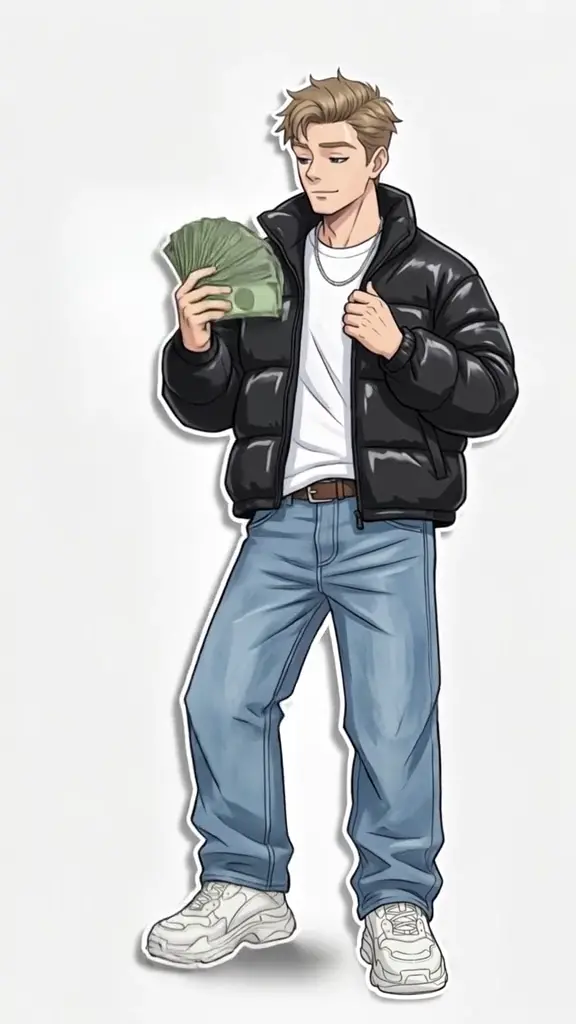
Cash fan · with sound
A drawn figure holds a fan of bills near one shoulder. The other hand rests on the jacket as the weight shifts between the sneakers.
Puffer sway · with sound
A glossy jacket catches the light as the shoulders rock. One hand stays low with the folded bills.
Pocket sway · silent
The figure keeps both hands near the pockets of a dark jacket. The swaying pose leaves the face in view. This cut has no soundtrack.
Can I make a Wassup in a Minute AI video completely free, without a watermark or a credit card?
You can watch all three motion previews without signing in or entering payment details. They show the template before you spend credits. Seeing your own face in the finished animation requires a render. The five-credit signup gift for eligible accounts falls short of the lowest quote, 16 credits for Mini at 480p. The dollar values below show what those credits represent at the Studio monthly rate of $49.90 for 1,800 credits. Seedance 2.5 reviews the portrait before rendering. Rejected portraits have their reserved credits returned. Your actual cash outlay depends on the pack or plan you buy.
| Model | Resolution | Credits | Studio equivalent |
|---|---|---|---|
| Seedance 2.0 Mini | 480p | 16 | $0.44 |
| Seedance 2.0 Mini | 720p | 35 | $0.97 |
| Seedance 2.0 Fast | 480p | 35 | $0.97 |
| Seedance 2.0 Fast | 720p | 74 | $2.05 |
| Seedance 2.0 Pro | 480p | 58 | $1.61 |
| Seedance 2.0 Pro | 720p | 124 | $3.44 |
| Seedance 2.0 Pro | 1080p | 312 | $8.65 |
| Seedance 2.5 | 480p | 84 | $2.33 |
| Seedance 2.5 | 720p | 187 | $5.18 |
| Seedance 2.5 | 1080p | 462 | $12.81 |
| MiniMax H3 | 768P | 83 | $2.30 |
| MiniMax H3 | 2K | 132 | $3.66 |
| Free allowance | Sample playback is free. Eligible signups get 5 credits. A personalized video starts at 16 spendable credits. |
|---|---|
| Watermark | Unpaid accounts receive the moving TryH3 mark when enabled. A completed pack or subscription purchase unlocks a clean download while the original is retained. |
| Failure and retry | A failed paid task refunds its generation credits. A completed clip with an unwanted gesture still counts as a render. A new take costs the displayed quote again. |
How much does it actually cost to make one Wassup in a Minute AI video in 2026?
For a single clip, check what the first payment buys. TryH3 quotes an eight-second render in credits before you submit. At the lowest Studio monthly credit rate, the smallest render uses about $0.44 of that balance. Jump on the Trend lists a 100-credit video and sells a pack of that size for $6.99. MakeViral lists its anime option from 56 of its own credits. Each service defines its own credit, so compare the clip length, preview and download terms alongside the numbers.
| Tool | Published price | Free allowance | Watermark | Output |
|---|---|---|---|---|
| TryH3 | 16–462 credits | Scene playback. 5 signup credits if eligible. | Moving mark for unpaid accounts when enabled. Clean after purchase. | 8 s vertical MP4, sound depends on motion |
| Jump on the Trend | 100 credits. 100-credit pack $6.99. | Free personalized preview | Not publicly specified for this template | 10 s vertical video, silent |
| MakeViral | Anime from 56 credits | Free render allowance undisclosed | No watermark | 10 s solo anime MP4 with sound |
Why does my face keep changing in the middle of my Wassup in a Minute AI video?
A small face, heavy shadow or hair across one eye can leave too little detail for the model to recognize the same person throughout a sway. Try a sharper portrait with even light and enough space around the head. Drawn eyes and jawlines simplify real features, so even a clear photo can lose a distinctive expression. Fine fingers and the edges of individual bills can also blend during movement. The template follows one person throughout. It cannot assign four different faces to consecutive beats or turn a group photo into a timed lineup.
What's the song in those Wassup in a Minute edits?
The audio associated with the Atlanta Lock edits is zbee’s Jersey club remix of “From Time” by Drake and Jhené Aiko. That vocal is why the trend also turns up as “wassup been a minute” or “wasala in a minute.” On this page, play each preview to hear the specific audio available with the template. Cash fan and puffer sway carry their respective preview tracks. Pocket sway exports silently, so you can choose a sound inside your posting app and align the first shoulder dip with its first beat.
Is there a legit Wassup in a Minute AI generator that works directly in Safari on my iPhone?
You can choose a picture from your phone in Safari and use the same browser to view your finished clip. Start by playing a sample to check which gesture you want. Sign in to TryH3 when you are ready to render and keep the same account when you return to your creations. You do not need to connect a social account to make the video. If you plan to post from a phone, save the MP4 first, then choose it in the app where you want to share it.
Which Android app can make the wassup been a minute anime dance effect?
Open this generator in Android Chrome and choose a portrait from your gallery. The server renders the clip, so your phone only needs to upload a picture and play the resulting MP4.
I already have an AI-generated full-body anime drawing of myself. How do I turn that still image into the Wassup in a Minute animation?
Use a clear drawing of one adult as your portrait. Choose a motion whose framing suits your character. Expect the model to redraw clothing and simplify small details as it follows the reference.
How do I make the Wassup in a Minute edit with four friends appearing one after another like the original Blue Lock animation?
Make one clip per consenting adult, then cut between the people on successive beats in your editor. Each render has its own credit charge. A single job accepts one portrait and produces one performer.
My AI-generated Wassup video looks blurry after uploading to TikTok. What export settings should I use?
Use the original downloaded MP4 and keep the 9:16 frame when posting. For more detail, select 1080p on Seedance Pro or 2.5, or 2K on MiniMax H3. Enlarging a 480p download cannot recover the original outlines or restore shoes cut off by a crop.
Should I upload the video silently and add the trending sound inside TikTok, or export it with audio?
Choose Pocket sway for a silent base. With either of the other takes, listen to the included track before posting. Mute it in your editor if you plan to add a different track so the two beats do not compete.
Is “in a minute wassup” the same trend as “whats up in a minute AI”?
Both spellings can lead to the anime streetwear sway. Look at the example before choosing a tool. A drawing rocking against white is the anime version, while two people dancing in a room indicate a live-action template.