ALORS ON DANSE AI VIDEO · TWO-PHOTO SWAP
Alors on Danse AI Video Generator from Two Photos
Upload two photos, one person each. Photo 1 plays the performer on the left, on the keys; Photo 2 plays the performer on the right who hypes the room and leans into the lens. The white studio, the moves, the cuts and the Alors on danse beat are already in the template, so there is no prompt to write.
10 s at 720p: 24 credits on Seedance 2.0 Mini · $5 Trial pack = 24 credits · Free accounts get a moving watermark; any purchase unlocks watermark-free downloads · Failed videos are refunded
Photo 1 · On the keys (left)
One person, face forward, upper body visible
Photo 2 · The hype-man (right)
One person, face forward, upper body visible
Each photo: 300–6000 px wide and high, up to 30 MB. Use an original portrait or upper-body photo; avoid a tight, narrow crop.
720p · 9:16 · MP4 · Alors on danse beat included
This video costs 223 credits. Charged when you start, refunded automatically if it fails.
How to make an Alors on Danse AI video from two photos
Upload one photo for each performer: Photo 1 is the person on the keys on the left, Photo 2 the hype-man on the right who leans into the lens. Pick Seedance 2.5 (the default, best quality), MiniMax H3 (balanced) or a Seedance 2.0 model (Mini is the cheapest), choose vertical 9:16 or 16:9, 5, 10, 15 or 30 seconds and 480p to 1080p, and press Generate. The Alors on Danse AI video generator swaps both performers into the white-studio meme clip, keeps its moves, cuts and timing, and lays the Alors on danse beat back under the finished MP4. The credit price is shown before you start; a 10-second 720p video on Seedance 2.0 Mini is 24 credits, and a failed video is refunded automatically.
Alors on Danse AI video at a glance
| Inputs | 2 photos, one person in each. JPG, PNG or WebP, 300–6000 px per side, up to 30 MB |
|---|---|
| Photo 1 | Plays the performer on the viewer's left, the one playing the keyboard (Kratos in the reference clip) |
| Photo 2 | Plays the performer on the viewer's right, the one hyping the room, pointing and leaning into the camera (Zeus in the reference clip) |
| Roles | Follow the screen sides: left stays Photo 1 and right stays Photo 2 through every cut. Swap flips them before you generate |
| Motion source | A fixed vertical remake of the Alors on danse studio sketch with Kratos and Zeus. No prompt to write |
| Models | Seedance 2.5 (default, best quality), Seedance 2.0 Mini (cheapest), MiniMax H3 (balanced), Seedance 2.0 Fast, Seedance 2.0 Pro |
| Length | 5, 10, 15 or 30 seconds. 30 seconds is the whole meme and holds the clip's last frame after 28.4 s; on Seedance 2.0 models and MiniMax H3 it is two 15-second parts joined into one, Seedance 2.5 makes it in one generation |
| Output | MP4, vertical 9:16 (default) or 16:9. 9:16: 480 × 854, 720 × 1280 or 1080 × 1920; 16:9: 854 × 480, 1280 × 720 or 1920 × 1080. 480p and 720p on every Seedance model, 1080p on Seedance 2.0 Pro and 2.5; MiniMax H3 makes 720p and 1080p |
| Audio | The reference clip's audio (the Alors on danse beat) is added back under your video. The model itself generates no sound |
| Cost | From 6 credits (Mini, 5 s, 480p). 10 s at 720p: Mini 24, Fast 88, MiniMax H3 98, 2.0 Pro 148, 2.5 223 credits |
| $5 Trial pack | 24 credits, one-time: one 10-second 720p Mini video or two 5-second ones |
| Watermark | A moving tryh3.com mark on videos made before your first purchase; any purchase unlocks watermark-free downloads, including saved copies of earlier videos |
| If it fails | Credits are charged when you start and refunded automatically, including when Seedance 2.5's photo review rejects a picture |
| Device | Any phone or desktop browser. No app to install |
Alors on Danse AI video examples
Explore Alors on Danse remakes and a two-photo example. Three-person variations are shown for inspiration; this tool takes two photos.
The characters and likenesses belong to their owners. The three-person versions are a variation this tool does not make: it takes two photos. Your video follows the vertical Kratos and Zeus clip shown in the generator above; results vary with the photos and the model.
How to Make an Alors on Danse AI Video in 3 Steps
The published how-to for making the Alors on Danse meme has you trim the sketch yourself, write a two-person prompt for a video model, generate three to five times and cut the winner in an editor. Here the clip, the roles and the beat are already in place: making the meme is two uploads and one click.
- 01
Upload a photo for each performer
Add one clear photo for Photo 1, the person on the keys on the left, and one for Photo 2, the hype-man on the right. One person per photo, face visible. Press Swap if you want them the other way round.
- 02
Choose a model, length and resolution
Seedance 2.5 is selected by default and makes the full 30-second meme in one pass; Seedance 2.0 Mini is the cheapest, and MiniMax H3 balances price and quality, with Fast and Pro alongside. Pick 5, 10, 15 or 30 seconds and 480p, 720p or 1080p. The credits for that exact setting show next to the button.
- 03
Generate, check both faces and download
Press Generate, then keep the page open or come back later. When the Alors on Danse AI video is ready, play it with sound, check both people in the lean-in close-up and the final walk-off, and download the MP4 for TikTok, Reels, Shorts or X.
Which Photo Plays Which Performer?
The two roles come from the reference clip and follow the sides of the frame. The performer on the left plays the keyboard for the whole clip; the performer on the right does the hyping, the pointing and the lean into the camera, then both walk off across the studio in the last shot.
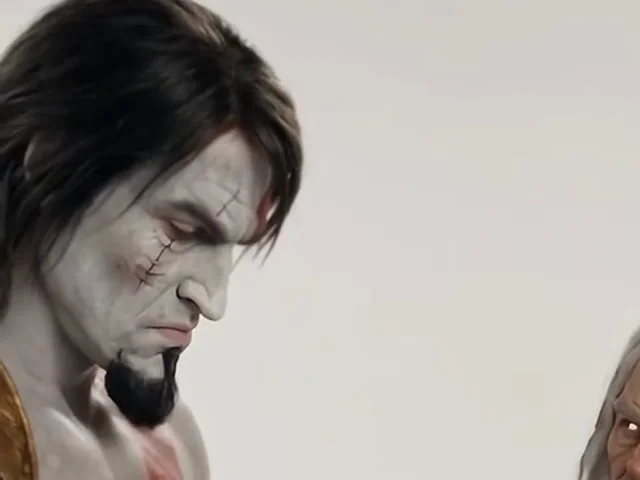
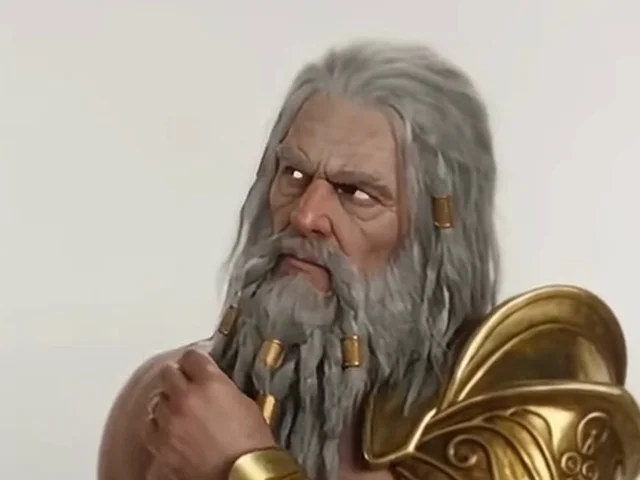
- Roles don't change at camera cuts. Left stays Photo 1 and right stays Photo 2 in every shot, including the close-up and the walk-off.
- The original sketch is mirrored compared with some AI versions. In this template the keys are on the left; if you want yourself on the keys, upload yourself as Photo 1 or press Swap.
What stays from the reference
- The studio. The seamless white room, the table with the laptop and mini keyboard, the lighting and the camera cuts.
- The performance. Playing the keys, the pointing on the beat, the lean-in close-up and the walk-off across the studio follow the reference.
- The audio. The reference clip's Alors on danse beat is laid under the finished MP4, in time with the cuts.
What comes from your photos
- Faces and hair. Each person's face, hairstyle and glasses come from their own photo.
- Clothes and build. Outfits come from your photos, not from the armour, skirts or body paint in the reference clip.
Alors on Danse AI Video Models and Prices
This Alors on Danse AI video generator runs on four Seedance models and MiniMax H3, all from the same reference clip. Prices below are credits at 720p, the default, and are the same for every account and credit pack; 480p costs less and 1080p (Seedance 2.0 Pro, Seedance 2.5 and MiniMax H3 only) costs more.
| Model | 5s | 10s | 15s | 30s | Resolutions | Notes |
|---|---|---|---|---|---|---|
| Seedance 2.5 | 112 | 223 | 334 | 667 | 480p · 720p · 1080p | Default and best quality. Makes the whole 30 s meme in one generation; your photos pass the model provider's review first |
| Seedance 2.0 Mini | 12 | 24 | 36 | 72 | 480p · 720p | Cheapest; 480p and 720p. Good for a first test of a pair of photos |
| Seedance 2.0 Fast | 44 | 88 | 132 | 264 | 480p · 720p | Mid price; 480p and 720p |
| MiniMax H3 | 49 | 98 | 147 | 294 | 720p · 1080p | Balanced price and quality; 720p and 1080p. A 30 s video is two 15-second parts joined into one |
| Seedance 2.0 Pro | 74 | 148 | 221 | 442 | 480p · 720p · 1080p | Full Seedance 2.0; up to 1080p |
Tip: test a new pair of photos with a 5-second Mini video (12 credits at 720p, 6 at 480p). When both faces look right, make the 30-second version or switch to Seedance 2.5.
Does the Alors on Danse AI Video Include the Song?
Yes. Your MP4 includes the reference clip's audio — the Alors on danse beat as it plays in the studio meme — laid back under your video in time with the cuts, so the keys, the claps and the lean-in land on the beat. The model itself renders a silent video; nothing is re-sung or re-mixed.
Mouth movements follow the reference, so lip sync is close rather than word-perfect. The music belongs to its rights holders: when you post publicly, TikTok or Instagram may match the track and apply their own rules, and a commercial use needs a licence from the owners, not from this page.
This Page vs Making the Alors on Danse AI Video Yourself
As of October 7, 2026 the published way to make the Alors on Danse AI video is a reconstruction: nobody who posted a viral version shared a tool or a prompt. Here is how this page compares with doing it yourself in a video model or a general AI dance video generator:
| Point | TryH3 (this page) | Doing it yourself (the published how-to method) |
|---|---|---|
| What you upload | Two photos. The clip is already cut and hosted | Two photos plus a 20–30 s cut of the sketch you trim yourself |
| Prompt | None. The two-person prompt and the role instructions are built in | A written prompt naming @Video1, @Image1 and @Image2 and everything that must stay |
| Sides and the keyboard | Left and right are locked to Photo 1 and Photo 2; a swap is one click | Common failures: the two people change sides, or the keyboard grows extra keys |
| Sound | The clip's audio is laid under the finished MP4 | Silent output; you add the track in CapCut or TikTok |
| Price and retries | Credits shown before you generate, from 6; a failed video is refunded | Three to five generations to pick a keeper, each paid for separately |
General AI dance video generators and dance-from-photo apps make a new scene from one photo and a song; they do not reproduce this two-person studio sketch. The how-to details come from public write-ups and change often; check the current terms of any tool before you pay.
Photo Tips for Keeping Both Faces Recognizable
Your photos decide most of the result. Exact likeness is not guaranteed — faces, hair and hands can drift during fast moves and right after cuts — but these habits make an Alors on Danse AI video that still looks like the two of you:
- One person per photo. Crop group shots to the person you mean; two faces in one photo can blend.
- Face the camera. Front or three-quarter views with visible eyes work best; sunglasses, hands or hair over the face lose detail.
- Use your sharpest photo for Photo 2. The hype-man leans into the lens for the close-up, so that face needs the most detail.
- Show the upper body. A waist-up or full-body photo carries clothes and build into the final shot where both walk off across the studio.
- Even, bright light. The studio is pure white; photos lit evenly, without heavy shadows, blend into it best.
- Start short. Try 5 seconds on Mini first, then make the 30-second version once both faces look right.
Is the Alors on Danse AI Video Generator Free?
Short answer: creating an account and previewing the template are free; each video costs credits, shown before you generate, and videos made before a purchase carry a watermark. There is no subscription requirement — any account with enough credits can generate.
Free
- Creating an account, uploading photos and playing the Alors on Danse reference clip
- Generating on any account with enough credits — no plan or subscription required
- No editing app, prompt or video skills needed
Paid
- Each video costs credits, shown next to the Generate button.
- The $5 Trial pack (24 credits, one-time) covers one 10-second 720p Seedance 2.0 Mini Alors on Danse video, or two 5-second ones.
- An Alors on Danse AI video costs 6 to 1183 credits, depending on the model, resolution and length.
- Videos made before your first purchase carry a moving tryh3.com watermark. After any credit pack, new videos have none, and saved watermark-free copies of earlier videos unlock too.
- Credits are charged when you start and refunded automatically if a generation fails or a photo is rejected by the model provider's review.
What Is the Alors on Danse AI Meme?
The clip behind the Alors on Danse AI meme is not a real recording session. It is a scripted sketch from comedian Jamel Debbouze's 2010 DVD Made in Jamel: in a white studio with a laptop and a mini keyboard, Jamel pretends to teach Stromae his own hit “Alors on danse”, pointing, clapping and leaning into the camera on the beat. Fan uploads of the sketch have passed ten million views, it has circulated on TikTok as a meme since 2024, and in 2026 viewers were still asking in the comments what the song is: it is Stromae's 2009 single — the title means “so we dance” — which topped the charts in 19 countries.
The AI version turned it into a two-person AI trend. In spring 2026 developers captioned the sketch as a programmer-and-Claude parody; at the start of October 2026 an AI remake with Sam Altman and Dario Amodei in the studio reached 198,000 views on X in a day, and Yapayzekaserisi's “MC Gandalf x DJ Frodo” version passed a million plays on TikTok, followed by Harry Potter, Star Wars, football and pet versions. Nobody published a tool or a prompt, and the viral copies run about 30 seconds. This page's template is the vertical Kratos and Zeus remake: video models reject reference clips of real or look-alike celebrities, so game characters keep the same studio, cuts and beat for your two photos.
Don't confuse it with the other Alors on Danse TikTok trend. In 2021 a slowed version of the song went viral with a group dance by @usimmango — friends swaying in sync on the beat drop, 118 million views — and that trend is real people dancing, not an AI video. This generator makes the 2026 studio meme only.
TryH3 is an independent tool, not affiliated with or endorsed by Stromae, Jamel Debbouze, their labels, TikTok. The template is an AI remake of a copyrighted sketch; use photos of yourself or of people who agreed, keep it a labelled parody, and get the rights holders' permission before any commercial use.
Alors on Danse AI Video FAQ
Which website can make the Alors on Danse AI video from two photos?
This page does. Upload one photo for each performer, choose a model (Seedance 2.5 by default, Seedance 2.0 or MiniMax H3), a vertical 9:16 or 16:9 frame, the length and resolution, and download an MP4 with the reference clip's audio. Photo 1 goes on the keys on the left, Photo 2 is the hype-man on the right. No prompt, no editing app.
What is the clip in the Alors on Danse AI meme, and is it a real studio session?
No. It is a scripted sketch from Jamel Debbouze's 2010 DVD Made in Jamel, in which Jamel pretends to write Stromae's 2009 hit with him in a white studio. The AI meme swaps two new faces into that sketch; this page's template is cut from one of those AI versions, not from the DVD itself.
What song is this, and what does “Alors on danse” mean?
“Alors on danse” is a 2009 single by the Belgian artist Stromae. The title means “so we dance”: the lyrics list work, debt and heartbreak and answer each with dancing. It topped the charts in 19 countries and is the beat you hear under every Alors on Danse AI video.
Do I need to write an Alors on Danse AI prompt?
No. The reference clip and the two-person instructions are built in. The published how-to needs a prompt that names the video and both images and lists everything that must stay; here you upload two photos, choose the settings and press Generate.
Which photo plays which performer?
Photo 1 plays the performer on the viewer's left, the one on the keys; Photo 2 plays the performer on the right, who hypes the room and leans into the camera. The sides stay locked through every cut, and the Swap button flips them before you generate.
Which model should I use for the Alors on Danse meme?
Seedance 2.5 is the default and the best quality, and makes the full 30-second meme in one generation; its photos go through the model provider's review first. Seedance 2.0 Mini is the cheapest and a good first test. MiniMax H3 is the balanced choice at 720p or 1080p. Fast and Pro sit in between, and Pro adds 1080p. On a 2.0 model or MiniMax H3 a 30-second video is two 15-second parts joined into one.
How much does an Alors on Danse AI video cost?
From 6 credits (Mini, 5 seconds, 480p). At 720p, 10 seconds costs 24 credits on Mini, 88 on Fast, 98 on MiniMax H3, 148 on Seedance 2.0 Pro and 223 on Seedance 2.5; the full 30-second meme is 72 credits on Mini and 667 on Seedance 2.5 at 720p. The $5 Trial pack (24 credits) covers one 10-second 720p Mini video. The exact price for your settings is shown before you generate.
Can I download it without a watermark?
Yes, after any purchase. Videos made before your first purchase carry a moving tryh3.com watermark; once you buy a credit pack, downloads are watermark-free, including saved watermark-free copies of videos you made earlier.
How long is the video, and can it be vertical?
Choose 5, 10, 15 or 30 seconds; 30 seconds is the whole meme. The reference clip is vertical, so 9:16 is the default — 480 × 854, 720 × 1280 or 1080 × 1920, ready for TikTok, Reels and Shorts. You can also choose 16:9 (854 × 480, 1280 × 720 or 1920 × 1080); the model then widens the white studio, and the moves and close-up can follow the clip less exactly.
How do I keep both faces looking like our photos?
Use one clear, front-facing photo per person, with your sharpest photo as Photo 2, who gets the lean-in close-up. Exact likeness isn't guaranteed: faces, hair and hands can drift during fast moves and after cuts. Test with a 5-second Mini video first, then make the longer version.
What happens if a generation fails or a photo is rejected?
Your credits are refunded automatically. If Seedance 2.5's review doesn't accept a photo, the video stops before generating and is refunded too; try a clearer photo of one real person, or choose a Seedance 2.0 model.
Can I use a celebrity's photo, or post the video commercially?
Use photos of yourself or of people who agreed to appear. The sketch, the song and the likenesses in the reference clip belong to their owners; a labelled parody for your own feed is how the trend is used, but a commercial use needs the rights holders' permission, and this page cannot grant it.
Put the Two of You in the Studio
Two photos, one white studio and the Alors on danse beat. Choose Seedance or MiniMax H3, 5 to 30 seconds and 480p to 1080p — refunded automatically if a generation fails.
Upload two photos