How do I make the street light slide AI video using just one photo of myself?
Choose a portrait that shows how you want to look at the end of the clip. The street light slide AI video generator supplies the empty path, the lamp and the motion, so a daylight photo works. The CapCut template titled “ai,” published by li88y99 on October 21, lists one clip in a vertical frame. If your editor asks for video, you can use the original still here. Open the photo picker, select a model and resolution, check the credit quote, then generate. You can reopen the finished MP4 from Creations.
- Pick one portraitShow the whole hairline and both shoulders of the consenting adult who will appear under the lamp.
- Choose the exportMini at 480p costs 10 credits. Choose 720p for more detail in the final close-up, then confirm permission.
- Play it with soundCheck the pause and the final face. Download the five-second MP4 from the result or reopen it in Creations.
What is that street light slide AI trend everyone's doing on TikTok?
Watch the lamp rather than the face for the first second. It stays in place while a small figure skids left along the pavement. For a moment the path is empty. Around a second and a half in, the subject enters from the lower left and comes to rest close enough to see their expression. A widely shared October 22, 2026 clip paired this switch in scale with the excerpt labeled “original sound - naddy.” Some street light trend videos send the camera down the road. In these three takes, the person makes the move.
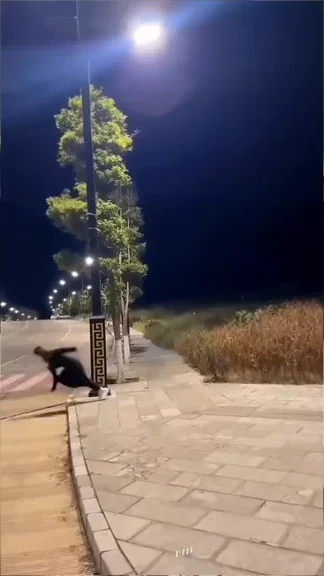 0.04 sSlide out
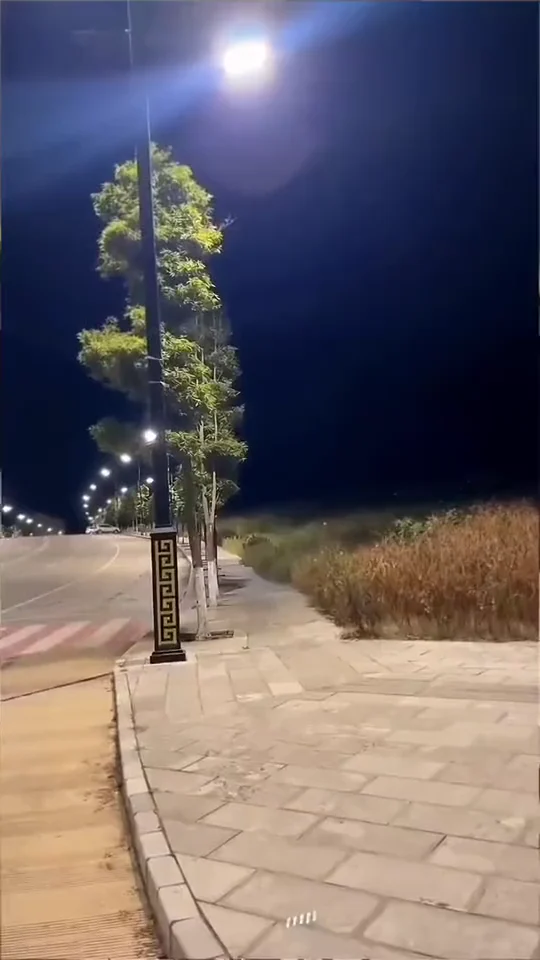 1.00 sHold on the path
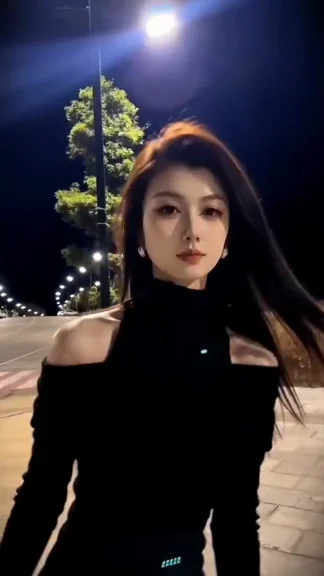 2.25 sSettle under the lamp
Black knit under the lamp
A low slide past the curb, a beat of empty pavement, then long dark hair sweeps across the close-up.
Olive jacket, white tee
The jacket enters at the lower left. The shoulders settle and a slight smile appears under the lamp.
Short curls and a sage shirt
Short curls catch the rim light as the subject slides into a steady, front-facing portrait.
How much does it usually cost to make one street light slide AI video?
One five-second take costs 10 credits on Seedance 2.0 Mini at 480p, or 22 credits on the same model at 720p. Both include the motion guide and the finished soundtrack. On the Studio monthly plan, 10 credits represent about $0.28 of the $49.90 monthly allowance. That figure describes usage on that plan. Starting from an empty balance, the $5 trial pack buys 24 credits, enough for two Mini 480p takes or one Mini 720p take. Check the selected row before you generate a different version.
| Model | Resolution | Credits | Studio equivalent |
|---|---|---|---|
| Seedance 2.0 Mini | 480p | 10 | $0.28 |
| Seedance 2.0 Mini | 720p | 22 | $0.61 |
| Seedance 2.0 Fast | 480p | 22 | $0.61 |
| Seedance 2.0 Fast | 720p | 47 | $1.30 |
| Seedance 2.0 Pro | 480p | 37 | $1.03 |
| Seedance 2.0 Pro | 720p | 78 | $2.16 |
| Seedance 2.0 Pro | 1080p | 195 | $5.41 |
| Seedance 2.5 | 480p | 52 | $1.44 |
| Seedance 2.5 | 720p | 117 | $3.24 |
| Seedance 2.5 | 1080p | 289 | $8.01 |
| MiniMax H3 | 768P | 52 | $1.44 |
| Free allowance | Playing all three examples is free. Eligible signups get up to 5 credits. A new render needs at least 10 spendable credits. |
|---|---|
| Watermark | Unpaid accounts receive the moving TryH3 mark when enabled. A completed pack or subscription purchase unlocks a clean download while the original is retained. |
| Failure and retry | A failed paid task refunds its generation credits. A completed clip with an unwanted gesture still counts as a render. A new take costs the displayed quote again. |
What's the best AI tool for making the street light slide trend from a photo?
If you want the original-looking slide, play a sample and watch what happens to the streetlamp. In the fixed-camera version you can follow the pole through the wide shot and the close-up. For a single selfie, the next decisions are the length of the hold, the export quality and what you have to buy before rendering. MakeViral lists one five-second 720p setting. Videosi publishes a six-second Standard example price and several output shapes. TryH3 keeps the vertical five-second cut across its model choices. Each service sells credits on its own scale.
| Tool | Published price | Free allowance | Watermark | Output |
|---|---|---|---|---|
| TryH3 | 10 credits at Mini 480p. $5 buys 24 credits. | Up to 5 signup credits for eligible accounts. | Moving mark for unpaid accounts when enabled. Clean after purchase. | 5 s vertical MP4 with sound. 480p, 720p, 768P or 1080p by model. |
| Videosi | 5 credits at Standard 720p. $6.99 buys 10 credits. | No free generation. | No watermark. | 6 s video with sound. Vertical, square or landscape. |
| MakeViral | 84 credits at 720p. $9.99 buys 100 credits. | 0 signup credits. | No watermark. | 5 s vertical MP4 with sound. |
Why does my face look different in the street light slide AI video?
In the wide shot your face occupies only a few pixels. Judge the likeness when the subject has stopped under the lamp, about two seconds in. A portrait with hair across one eye, a strong beauty filter or a hand against the cheek leaves the model to guess details that become obvious in close-up. Use even lighting and leave room around the jaw. Higher resolution can sharpen the final portrait, but it cannot recover a face hidden in the input. This scene takes one person. It cannot stage two friends together or guarantee an identical expression.
Can you give me a copy-and-paste prompt for the street light slide AI trend?
The motion cue that matters most is the moment the pavement is empty. If you only ask someone to slide toward the camera, a video model may turn the whole trip into a walk. Give the distant exit and the close arrival separate times. Copy the first prompt to see the instructions TryH3 pairs with your portrait, the empty path and the motion guide. If you use a photo-capable Kling or Veo workflow without those references, try the second prompt. The timing will be less predictable.
What's the best photo to upload for the street light slide AI effect?
A chest-up portrait in soft, even light gives the model both the face and the neckline that will fill the last three seconds. A full-body photo can work if you can still see the eyes when you zoom in. Leave a little space above the hair and choose one person with no phone in front of their face. The photo background can be indoors because the path comes from a separate image. If two of you want matching clips, start with two individual portraits and make one take per person.
Can I create the street light slide AI transition on my laptop instead of using a phone app?
Yes. Open the generator in a desktop browser, choose a local photo and download the finished MP4. The file is already vertical. Transfer the original MP4 to your phone if you want to post there.
My best friend and I want to make matching street light slide videos for Instagram Reels. We each have one selfie. Should we generate two separate clips and edit them together, or is there a way to put both of us into the same scene?
Make one clip per person. The motion guide has one distant figure and one close-up of that same figure. Two faces in one upload make the identity ambiguous. Join the two finished clips at the empty-path beat in your editor.
Can I make the street light slide AI trend completely free?
The examples are free to watch. A fresh TryH3 generation starts at 10 spendable credits. The eligible signup gift of up to 5 credits cannot cover it on its own. Check the free allowance, render cost and watermark rows before buying a pack.
Is there a way to preview the street light slide animation with my own face before spending credits or paying for a download?
You can see your selected photo and play all three example videos before spending credits. Seeing your own face move under the lamp requires a render. Select a photo, model and resolution to see its price before submitting.
What's the difference between using a fixed street light slide template and making the same effect with a custom AI prompt?
The fixed AI slide transition effect uses a timed motion clip and an empty street image to set the view. Your photo supplies the person. A prompt alone gives an editor more freedom to change the road, move the camera or skip the pause.
Is the street light slide the same thing as the AI slide transition effect?
People use both names for the same night-path reveal. Some versions start with a hand on the pole, or push the camera forward along a road. Here a tiny figure slides out of a fixed wide shot and reappears chest-up from the lower left.