TWO PHOTOS · ONE AWKWARD EXCHANGE
Whats the Move AI Video
Put two faces into King Bach’s funeral meme: one asks what’s next, the other delivers the final-move punchline. Upload a photo for each role to make an 11-second vertical video with the scene’s dialogue. This is a meme video tool, not Move AI motion capture.
2 photos · 11 seconds · 9:16 MP4 · fixed dialogue
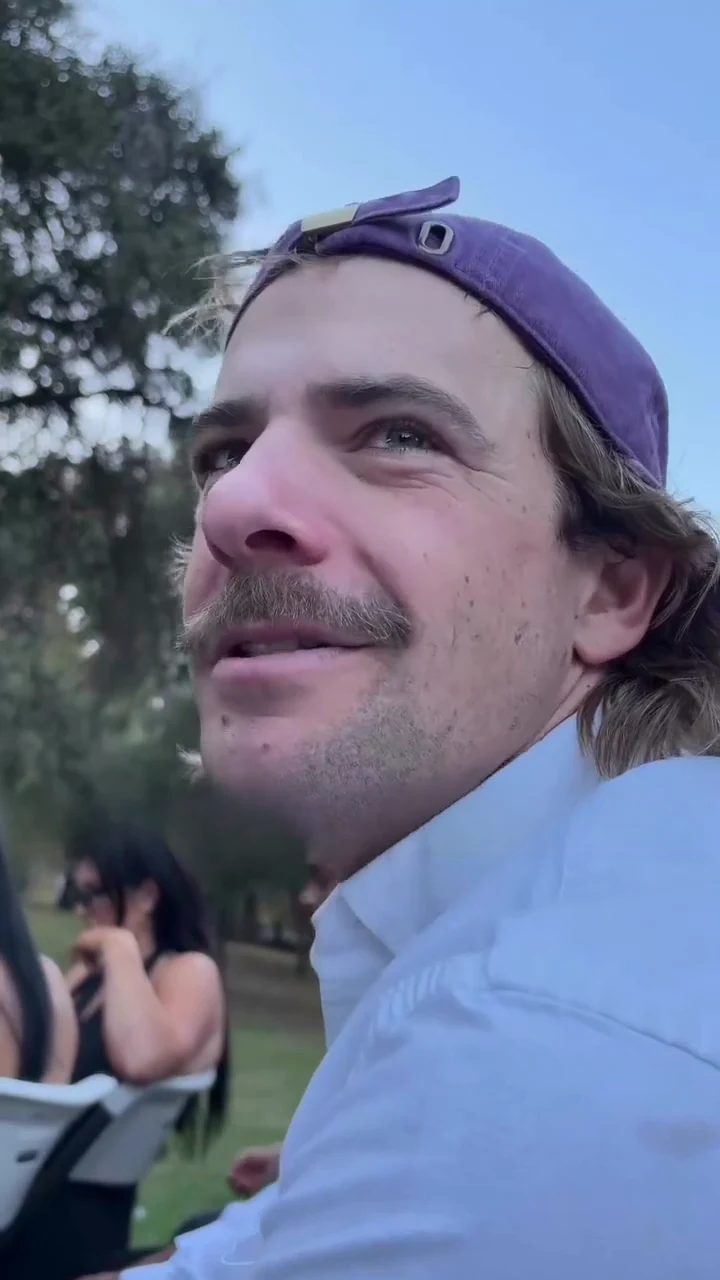 Photo 1 · Asker
One person, a clear face, even lighting
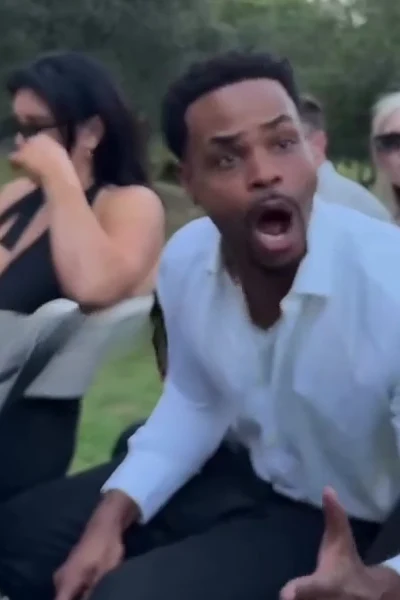 Photo 2 · Answerer
One person, a clear face, even lighting
Use separate JPG, PNG or WebP photos, up to 30 MB each, with each edge between 300 and 6,000 pixels. Show one front-facing person per photo, with eyes and mouth visible. Avoid wide-angle distortion and heavy filters. Use photos of people who agree to appear.
11-second MP4 · 480p · 9:16 · original dialogue included
This video costs 80 credits. Charged when you start, refunded automatically if it fails.
This scene starts at 80 credits. The $5 Trial contains 24 credits and cannot cover one video. Check your balance and the available packs before purchasing.
Watch the theres no move bro exchange
Play with sound to follow the opening question, the reply and the final camera turn. The template uses this funeral sequence and dialogue.
What is the whats the move AI video?
The whats the move AI video is a two-photo recreation of King Bach’s funeral sketch. One person asks what the plan is; the other points out that the funeral is the final destination. This tool assigns your first photo to the asker and your second to the answerer, then makes an 11-second vertical MP4 with the fixed scene dialogue.
The phrase “theres no move bro” refers to the answer in this sketch. Move AI is a separate motion-capture product; this page does not extract skeletons, animation rigs or 3D motion data.
The trend follows King Bach’s October 20, 2026 funeral sketch. King Bach’s funeral sketch
Who asks “what’s the move,” and who answers?
Choose the speaking roles before you submit. The order of your two photos controls the assignment; a gender label or a costume is not required.
| Upload slot | Role in the scene | What to check |
|---|---|---|
| Photo 1 · Asker | The opening close-up: the person asking what happens next. | Use the face you want in the opening question. In the reference scene, this is the purple-cap role. |
| Photo 2 · Answerer | The reply and the final-move punchline after the camera turns. | Use the face you want delivering the reply. Swap the photos before generating to reverse the roles. |
Two separate selfies are enough; you do not need to film either person. The template supplies the funeral setting, camera movement and dialogue. Face likeness and speaking-turn accuracy can vary.
Watch the theres no move bro exchange
Play with sound to follow the opening question, the reply and the final camera turn. The template uses this funeral sequence and dialogue.
The preview shows the scene to follow. Your generated result can differ in facial likeness, mouth movement, hand gestures and camera timing.
Check the whole 11-second scene, not just the first face
Use these approximate reference timings when watching your result. The fastest camera moves are also the easiest places to miss a face swap or a late speaking turn.
| Reference moment | What happens | Review your result |
|---|---|---|
| 0–2.6 seconds | The asker opens the conversation in close-up. | Does Photo 1 supply the face, and is the question assigned to that person? |
| About 2.6–3.6 seconds | The camera swings toward the answerer as the reply begins. | Check that the two identities do not merge or exchange during the movement. |
| About 2.8–8.4 seconds | The answerer delivers the reply and gestures toward the funeral. | Watch Photo 2’s mouth and hands; the asker should not appear to deliver the reply. |
| About 8.3–11 seconds | The view turns toward the funeral and holds the final reveal. | Check the reveal and background continuity. Exact camera speed is not guaranteed. |
Full-video price, free access and watermark terms
An 11-second video starts at 80 credits with Seedance 2.0 Pro at 480p. Both models below generate the same fixed scene. The table shows the current credit charge and its value at the lowest monthly credit rate; it is not a separate pay-per-video checkout.
| Model · 11 seconds | 480p | 720p | 1080p |
|---|---|---|---|
| Seedance 2.0 Pro | 80 credits · ≈ $2.22 | 171 credits · ≈ $4.74 | 428 credits · ≈ $11.87 |
| Seedance 2.5 | 115 credits · ≈ $3.19 | 258 credits · ≈ $7.15 | 634 credits · ≈ $17.58 |
Dollar values use Studio monthly: $49.90 for 1,800 credits, or about $0.02772 per credit. Other packs and plans have different rates. Seedance 2.5’s upstream estimate settles by token use; the displayed user credit charge is fixed when you submit.
| Item | What is included |
|---|---|
| Free access | Watch the preview without an account. Uploading and generating require sign-in. There is no separate free custom draft or pay-after-preview option. |
| Smallest sufficient one-time pack | $29.90 for 700 credits. The $5 Trial has 24 credits and cannot cover the 80-credit starting option. You can also use a sufficient existing balance or subscription. |
| Signup credits | Any eligible signup gift appears in your account balance. A gift is not a promise of a full funeral video: the minimum is 80 credits. |
| Download and sound | One 11-second 9:16 MP4, with the scene’s fixed dialogue. There is no custom voice, song picker, GIF export or separate silent-export setting. |
| Watermark | Before a completed Stripe or PayPal purchase, outputs may carry the TryH3 watermark under the site’s watermark setting. A purchase enables clean downloads where a saved original is available; new renders still use credits. |
| Resolution and model | Seedance 2.0 Pro or Seedance 2.5, at 480p, 720p or 1080p when available. Higher resolution changes the output size; it does not guarantee accurate faces or lip sync. |
A failed generation or rejected photo review returns the charged credits. A completed clip with imperfect likeness or mouth timing is still a completed render; starting another attempt uses credits.
Compare credit packs and plans ↗Make the funeral meme from two phone photos
- 01
Assign the asker and answerer
Open this page in your phone browser and add two separate portraits. Put the opening speaker in Photo 1 and the person giving the reply in Photo 2. Use Swap asker and answerer if the order is wrong.
- 02
Choose a model and check the cost
Choose Seedance 2.0 Pro or Seedance 2.5, then 480p, 720p or 1080p. The duration stays at 11 seconds and the frame at 9:16. Check the displayed credits against your balance before submitting.
- 03
Generate, review and download
Sign in and start the video. When it is ready, play it with sound and check both faces through the camera turns. Download the MP4 from the result or return to it in your saved creations.
The template supplies the prompt and dialogue. You do not need a motion-capture recording, an installed app or a separate voiceover.
When the faces or speaking turns look wrong
| What you notice | What to do next |
|---|---|
| The two people are in the wrong roles | Check the slot labels before generating. Photo 1 asks; Photo 2 answers. Use the swap control to exchange them. |
| Faces blend or switch during the pan | Use one person per photo, with similar image clarity and no obscured face. A sharp frontal portrait helps, but identity can still drift during fast motion. |
| The right voice comes from the wrong moving mouth | The dialogue track is fixed; mouth movement is generated. This page has no mouth-only repair control. Review the full clip before sharing; another generation uses credits. |
| A selfie is rejected or looks distorted | Use JPG, PNG or WebP within the displayed file limits. Choose a normal-distance photo with visible eyes and mouth, without wide-angle distortion or a strong beauty filter. |
| The downloaded video looks soft | Check that you downloaded the full MP4 and review your selected resolution. A higher-resolution generation may retain more detail, but it is a new paid attempt and does not repair identity errors automatically. |
Before sharing the whats the move funeral meme
This is a staged comedy scene about a funeral. Choose people who are comfortable appearing in that joke, and make the AI edit clear to viewers. The page does not change the script or turn the setting into a different story.
Buying credits does not provide a separate license to the underlying performance or dialogue. For a commercial post, check the permissions for the material and the destination platform’s rules.
Projects are saved in your account history and are not automatically published to the gallery. Stored media uses unlisted file links; anyone with a raw link can access that file. Avoid uploading photos you do not want processed.
What’s the Move AI video questions
Can I make the 11-second funeral video from two iPhone selfies?
Yes. Open the tool in your phone browser, upload one clear portrait per slot, assign the asker and answerer, choose a model and resolution, then sign in and generate with enough credits. No filming is required. The completed video downloads as a vertical MP4; the tool also works in an Android browser.
Which photo becomes the purple-cap asker and which delivers the final move?
Photo 1 supplies the person asking the opening question, the purple-cap role in the reference scene. Photo 2 supplies the person answering and delivering the final-move punchline. Use the swap control before generating if you want to reverse them.
Can my girlfriend ask the question while I give the answer?
Yes. Put her portrait in Photo 1 and yours in Photo 2, with each person’s agreement. The slots define the roles, and the template supplies the prompt. The fixed voices do not change to match the uploaded people, and exact facial likeness or speaking-turn accuracy is not guaranteed.
Is there a free whats the move AI video with a full watermark-free download?
The preview is free to watch, but a custom 11-second render starts at 80 credits. Any signup gift must still cover that charge. The $5 Trial contains only 24 credits; the smallest sufficient one-time pack is $29.90 for 700 credits. A completed Stripe or PayPal purchase enables clean downloads where the saved original is available.
Can I make a free low-resolution draft and pay only if I like it?
This page has no separate free draft or pay-after-preview option. The 480p setting is a full 11-second generation and uses credits. A later purchase can unlock the saved clean original of an eligible watermarked result, but it does not automatically make that result 720p or 1080p.
Why do our faces swap during the camera turn?
Fast camera movement can make the model confuse the two identities. First confirm Photo 1 is the asker and Photo 2 is the answerer. Use separate, sharp, front-facing portraits with unobstructed faces. Those checks improve the input but cannot guarantee that every frame keeps the right person.
Can I fix the wrong speaker or late lip sync without regenerating?
There is no built-in mouth-only or lip-sync repair here. The finished MP4 uses the fixed scene dialogue, while the model generates mouth movement, so they can disagree. You can edit the downloaded file elsewhere; a new generation on this page uses a new credit charge.
Can I change the punchline to a joke about our gaming squad?
This template keeps the funeral scene and its dialogue. It does not accept a replacement script, custom voice or different location. For a new story, start in the general reference-to-video workspace with material you can use; that is a separate workflow and will not automatically retain this template’s performance.
Choose who asks. Choose who answers.
Add two portraits, check the roles and review the credit quote for the full 11-second exchange.
Use my two photos