Where did the mummy zombie AI dance trend actually start?
The version you can make here is a Halloween phone-camera routine. A runner rushes into a startled selfie on a lamplit street, mouths a phrase, shows the back of their head and turns back wrapped in linen. The stiff-armed dance comes last. By October 15, 2026, a Halloween template guide was already describing this sequence. The first upload and its creator remain unverified. The animated film Mummy, I’m a Zombie follows a different story. In a Thriller group-dance template, the dancers start the choreography together. The single runner and the mid-shot costume change distinguish this version.
How do I make one of those mummy zombie dance AI videos using just a selfie?
Start with a clear photo of one adult and leave some space around the face and shoulders. Open this page in a phone or desktop browser, upload the portrait and choose a model and resolution. The credit quote above the generate button covers one complete take. The tool supplies the street, the turn and the dance, so you can leave the camera in your pocket. Once the MP4 is ready, play it with sound and check the eyes on both sides of the turn. Download in portrait orientation to keep the close-up in frame.
- 01
Choose a portrait
Use one consenting adult. Pick an evenly lit face with both eyes visible and room around the hair.
- 02
Check the quote
Choose Mini for 480p or 720p, or Seedance 2.5 for up to 1080p. Check the credit total before starting.
- 03
Play and download
Preview the turn and soundtrack, then save the full 15-second vertical MP4 from your finished project.
What's the song in the mummy zombie AI videos?
This template has a built-in soundtrack. Listen for the sung phrase in the close-up, then the accent as the performer turns back and steps away from the phone. The track title, recording artist and first upload are unconfirmed. A search for “mummy zombie song” also brings up children’s singalongs, including Papa Joel’s puzzle song. Those titles do not establish which recording accompanies this dance. Some template pages use the word Thriller to describe the zombie moves. There is no verified credit tying the soundtrack in these clips to Michael Jackson’s song.
Why does the mummy zombie AI filter keep changing my face so I don't look like myself?
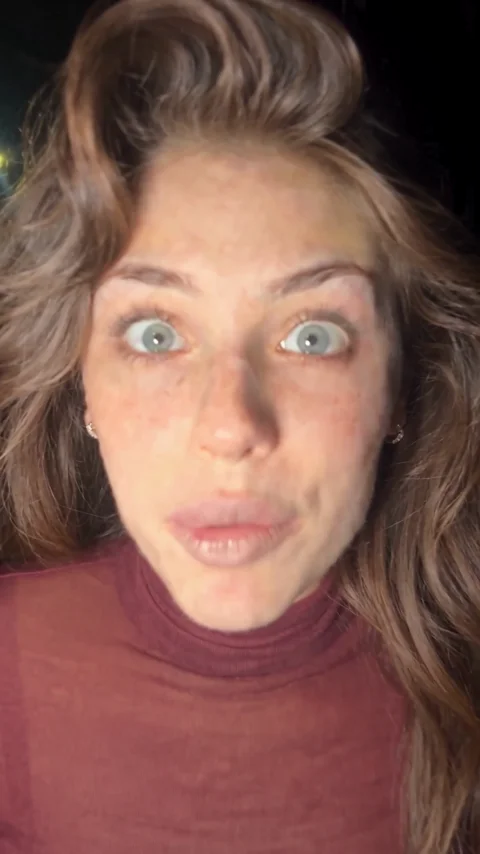
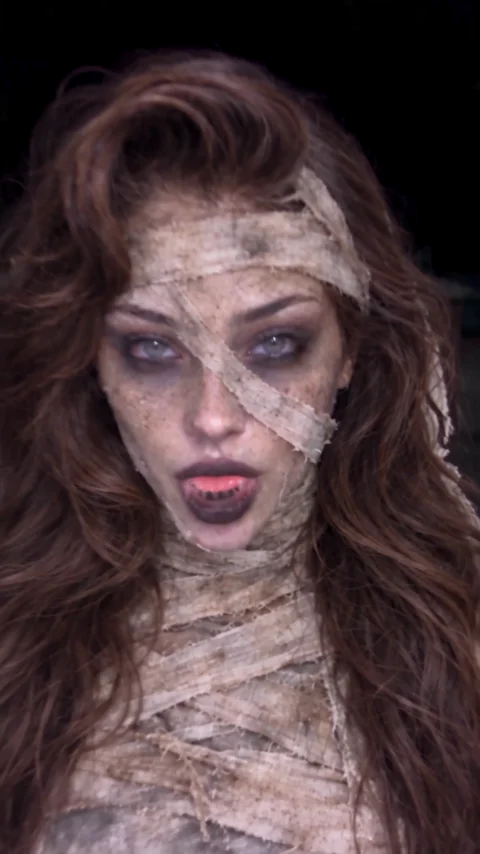
The turn briefly hides the features the model uses to recognize you. When the face returns, shadows and linen cover one side of it. Compare the eyes, brows and hairline on the two frames below, taken from the same performance. A front-facing portrait gives the model more to work with than a profile, sunglasses or a face in heavy shadow. Your starting outfit should remain until the reveal. Afterward the wraps replace it, and fast motion can still alter a feature or bend an arm. More pixels can sharpen an error as well as a good take.
How much does it cost to make one mummy zombie dance AI video?
A complete 15-second take starts at 30 credits on Seedance 2.0 Mini at 480p. The dollar equivalents below use the lowest monthly credit price, Studio at $49.90 for 1,800 credits. For a new account buying from a zero balance, the smallest standard one-time pack that covers the starting tier is $9.90 for 180 credits. A single $5 Trial pack supplies 24 credits. Higher resolution changes the quote, while the length, soundtrack and dance stay the same. A failed task returns its reserved credits. Starting over after a completed take uses another full quote.
| Model | Resolution | Length | Credits per take | Studio equivalent |
|---|---|---|---|---|
| Seedance 2.0 Mini | 480p | 15 s | 30 | $0.83 |
| Seedance 2.0 Mini | 720p | 15 s | 65 | $1.80 |
| Seedance 2.5 | 480p | 15 s | 156 | $4.32 |
| Seedance 2.5 | 720p | 15 s | 351 | $9.73 |
| Seedance 2.5 | 1080p | 15 s | 866 | $24.01 |
Can I make a mummy zombie AI dance video completely free?
You can watch the examples and inspect the turn frames without paying. The standard signup gift for eligible accounts is five credits. That leaves a 25-credit gap even on the lowest setting, so signup alone cannot pay for a personalized video. If you already have enough eligible credits, the account’s purchase history determines which download you see. Accounts without a completed purchase see a moving site watermark. A completed purchase unlocks the clean file for an eligible saved result. Check your balance and the displayed quote before committing to a take.
| Account or action | What it covers | Watermark or credit rule |
|---|---|---|
| Visitor | Watch sample videos | Sample playback is free |
| Eligible signup | 5 gift credits | 30 credits needed for Mini 480p |
| Enough eligible credits, no purchase | Full vertical MP4 | Moving site watermark |
| Purchased account, enough credits | Full vertical MP4 | Clean download |
| Task fails | No finished MP4 | Reserved credits returned |
What's the best AI tool for making the mummy zombie dance trend right now?
First check that the tool shows the running selfie and costume change you want. A generic face filter can give you pale skin without filming a dance. The table compares posted terms for the night-street version as of October 2026. Each service defines its own credits or tokens, so a smaller number on a button does not establish a lower dollar price. Use the output and purchase terms to narrow the choice: a 480p phone preview and a 1080p export cost different amounts here, even though the routine lasts the same 15 seconds.
| Tool | Price shown | Free allowance | Watermark | Output |
|---|---|---|---|---|
| TryH3 | 30–866 credits; from $9.90 for a sufficient pack | 5 credits if eligible | Clean for paying customers | 15 s vertical MP4, 480p–1080p |
| FIKKU | 40 FIKKU credits | Free signup; render allowance not publicly disclosed | Not publicly disclosed | About 15 s, vertical video with sound |
| Trendai | 2,125 credits; 5,000-credit pack $39.99 | Not publicly disclosed | Not publicly disclosed | About 15 s, vertical MP4 at 480p |
| Pixel+ | 7 Pixel+ tokens | Not publicly disclosed | Not publicly disclosed | One-photo dance video |
Is there an actual Mummy Zombie Dance AI app for iPhone, or is it just a web template?
You can make the clip in this browser on an iPhone, Android phone or computer. Open the upload field, select a portrait from your library and check the cost before you submit. You do not have to download a separate app, record yourself dancing, edit individual shots or supply a song. A finished project can be reopened from your creations to preview the video or download it again. The following questions cover the practical limits of this particular routine, including the one-person cast and what happens if the spin turns out badly.
Do I need to record myself running and dancing first?
One portrait supplies the performer. The tool builds the run, close-up, turn and dance as a single 15-second sequence.
Can I keep my real face and my Halloween outfit?
The upload supplies the face, hair, visible facial hair and starting outfit. A faceless stand-in supplies the movements for every portrait. A short-haired or bearded person can use the same template. Check the face again after the turn, when shadows and bandages can soften details.
Can my girlfriend and I make a matching mummy zombie dance?
This routine has one performer and accepts one portrait. Generate one take per person, then join the two clips in your editor. Each take uses its own credits.
Where can I find the original mummy zombie dance AI video and sound?
The first upload and the title of the recording remain unverified. Play the samples to hear this version. Other videos under the mummy zombie tag include a two-person hug with different choreography.
Can I save the dance without a watermark?
An account with a completed purchase can download the clean MP4. Other accounts see a moving site watermark. The eligible signup gift alone is below the 30-credit minimum.
Can I get a clearer 1080p result after the fast spin?
Choose Seedance 2.5 at 1080p before generating. This costs 866 credits for 15 seconds. More pixels help with detail but cannot repair an obscured eye or guarantee the face stays identical.
What if the bandages appear before the spin?
Play through the reveal before sharing. The intended change is at the turn, but timing and limb motion can drift. A completed take with an unwanted result needs a new paid render to try again. Failed tasks return reserved credits.